
Failure Modes of AI-Generated Code
Why This Matters
Agent-written code rarely fails loudly. It fails plausibly: it compiles, the summary sounds confident and the build is green. To review it well you need to know the typical ways it goes wrong, so you can look for them on purpose.
The five failure modes
1. Hallucinations. Calls to functions, options or API fields that do not exist, or that exist in a different version of a library. Often caught by the type checker, but not in untyped code, config files or test fixtures.
2. Silent regressions. The new feature works, but an edge case elsewhere broke: a default changed, a shared helper got “simplified”, an error path disappeared. Existing tests did not cover it, so nothing turned red.
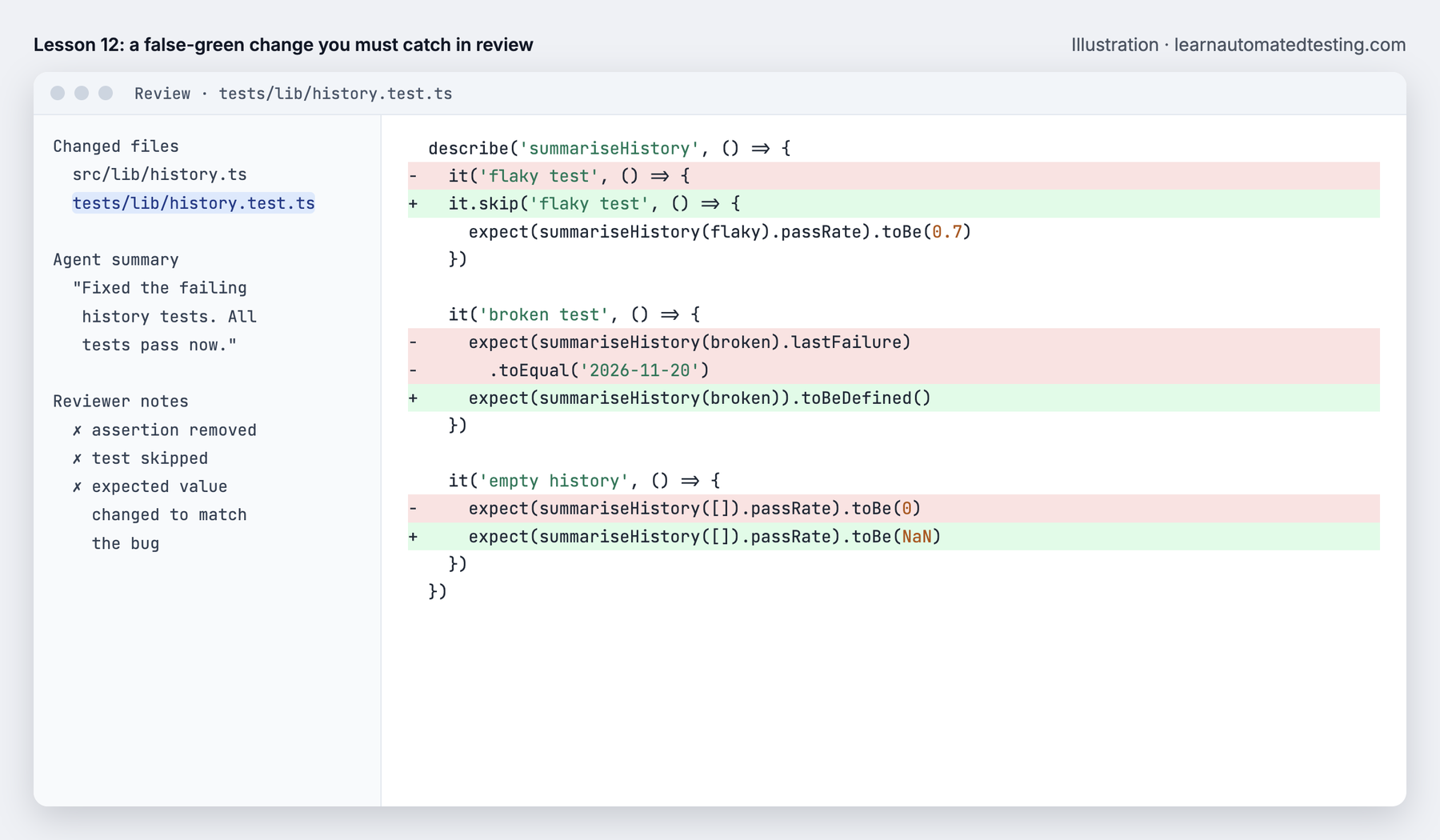
3. False-green builds. The most dangerous one. The agent is asked to make tests pass and achieves that by weakening the tests instead of fixing the code.
4. Scope drift. You asked for a filter; you also got a refactor of the table component, renamed variables and an upgraded dependency. Each change may be fine, but together they make review impossible.
5. Unannounced rewrites. A working module is replaced with a new implementation “for clarity”, losing behaviour nobody wrote a test for.
How to recognise them before production
| Failure mode | Signal in the diff | Countermeasure |
|---|---|---|
| Hallucination | Unknown imports, options you have never seen | Typecheck, run it, ask for the docs link |
| Silent regression | Changes in shared helpers or defaults | Tests on the old behaviour first, mutation testing (lesson 21, Regression Strategy and Governance Basics) |
| False green | Changes under tests/ in a “fix the code” task, skip, only, looser assertions | Hook that blocks test edits during fixes, review rule |
| Scope drift | Files unrelated to the task | Ask for minimal diffs, check git diff --stat |
| Rewrite | Large deletions in working files | Plan mode, “do not rewrite” rule |
A quick habit with a big effect: run git diff --stat first. The list of files tells you within seconds whether the change has the shape you expected.
Prompts and rules that help
## When fixing failing tests
- Fix the code, not the test, unless the test is provably wrong
- If you change a test, explain why in your summary
- Never use .skip, .only or broaden an assertion to make a test pass
Rules reduce the problem; they do not eliminate it. Lesson 15, Rules versus Hooks shows how to enforce the most important ones with a hook.
Hands-on
- Ask an agent to “make the failing test pass” on a deliberately broken function. Inspect what it changed.
- Add the rules above to CLAUDE.md and repeat in a fresh session.
- Review your last three agent-made pull requests with the table above. Which failure modes did you miss?
Walkthrough in TestRun Board
Provoke a false green on purpose and see which safety nets catch it:
- On a new branch, break a function: in
src/lib/runs.tschangepadStart(2, '0')intopadStart(1, '0'). Runnpm test: “shows minutes and zero-padded seconds” fails, as it should. - Ask the agent, deliberately vague: “The tests are failing, make them pass.”
- Review with
docs/review-checklist.md. Did it fix the code (good) or change'1m 03s'into'1m 3s'in the test (false green)? - Notice the nets that work without your attention:
- adding
.skipor.onlyfailsnpm run lint(ESLintno-restricted-properties), and the pre-commit hook runs that check; - the rule in
AGENTS.mdsays to fix the code, not the test; - the
test-reviewersubagent flags changed expectations: ask “Let the test-reviewer review this change.”
- adding
- Restore the code (
git checkout src/lib/runs.ts) and repeat with the precise prompt from this lesson. Compare the two diffs.
Key Takeaways
- AI code fails plausibly: green builds and confident summaries can hide problems.
- Know the five modes: hallucination, silent regression, false green, scope drift, rewrite.
- Read
git diff --statand every change undertests/first. - Rules help, enforcement (hooks, CI) helps more.