
Context Architecture: CLAUDE.md, AGENTS.md and Rules
Why This Matters
Every session starts with an empty context window. Without written context the agent guesses your commands, your folder conventions and your rules, and it guesses differently each time. Context files turn those guesses into facts that load automatically.
CLAUDE.md: the onboarding document
CLAUDE.md in the root of your repository is loaded at the start of every Claude Code session. Write it like onboarding notes for a new colleague: short, concrete and checked into git so the whole team shares it. Running /init in a new project gives you a first draft to edit.
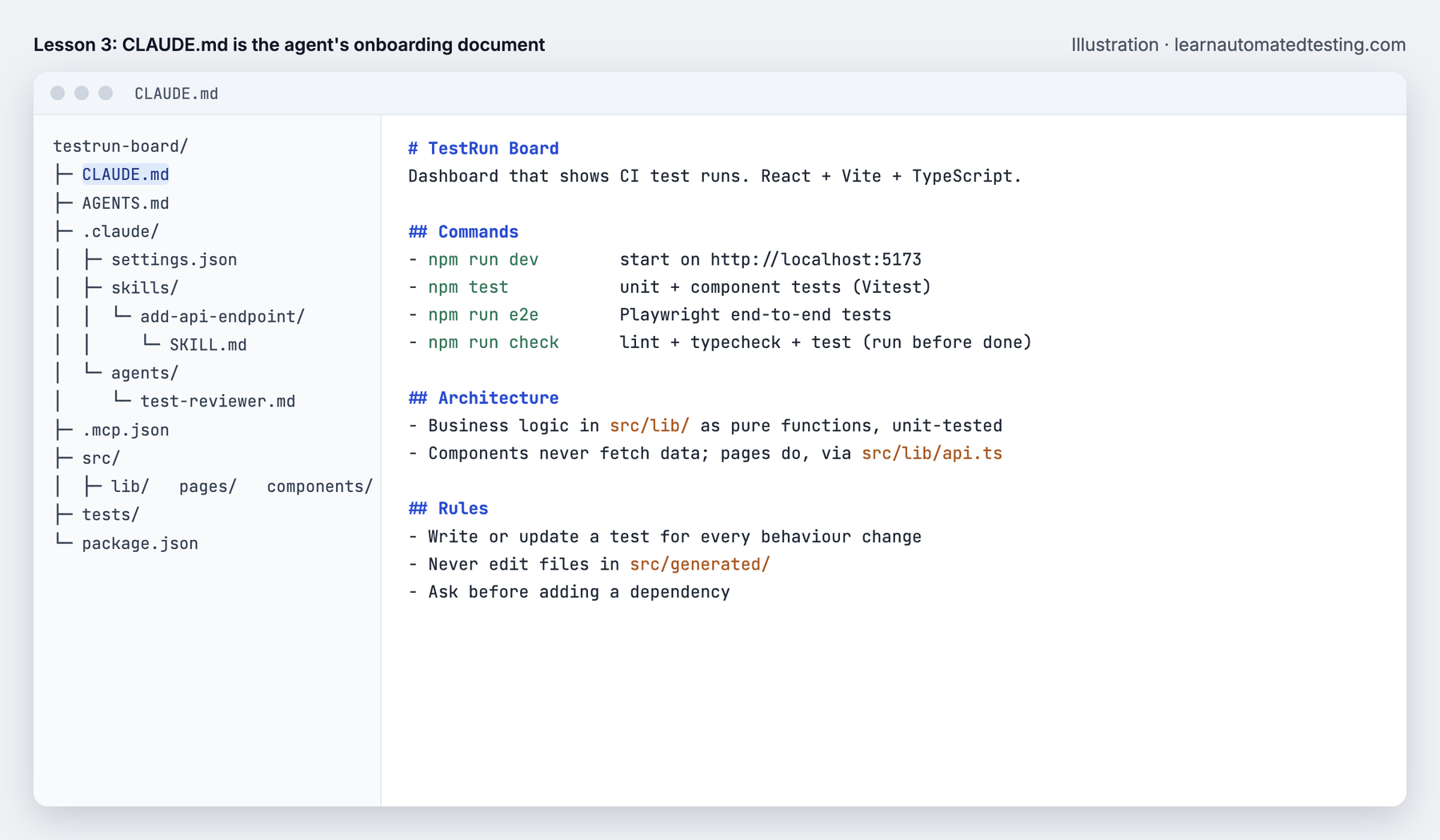
A good CLAUDE.md answers four questions:
- What is this? One or two sentences and the stack.
- How do I run it? Exact commands for dev, test, e2e and the full check.
- How is it organised? Where business logic lives, what talks to what.
- What are the rules? The few things that must always or never happen.
Keep it short (the official guidance is to stay well under a few hundred lines). Every line costs context in every session, and long files get followed less reliably.
The hierarchy: user, project, local
Claude Code combines several files:
| Level | File | Use it for |
|---|---|---|
| User | ~/.claude/CLAUDE.md | Your personal preferences in every project |
| Project | ./CLAUDE.md (or ./.claude/CLAUDE.md) | Team conventions, committed to git |
| Local | ./CLAUDE.local.md | Your personal notes for this project, not committed |
| Subfolder | src/api/CLAUDE.md | Loaded when the agent works in that folder |
Files in parent folders load at start; files in subfolders load when the agent works there. You can also import other files with @path/to/file.md, for example @docs/architecture.md.
AGENTS.md: one file for every harness
AGENTS.md is an open convention that other agents (OpenCode, Codex and more) read. If your team uses more than one harness, keep the shared instructions in AGENTS.md and make CLAUDE.md import it:
# CLAUDE.md
@AGENTS.md

## Claude Code specific
- Use the add-api-endpoint skill for changes in src/lib/api.ts
Rules files for specific areas
When CLAUDE.md grows, split it. Markdown files in .claude/rules/ are loaded as extra instructions, and a paths field in the frontmatter can scope a rule to matching files:
---
paths:
  - "tests/**/*.ts"
  - "tests/**/*.tsx"
---
# Test rules
- Use getByRole/getByLabel locators, never CSS classes
- One behaviour per test, named after the behaviour
Path scoping has had parser quirks between versions, so check with /memory that your rule is actually loaded.
In the example project, AGENTS.md holds the shared instructions, CLAUDE.md imports it and adds the Claude Code specifics, and .claude/rules/testing.md holds the test conventions.
Hands-on
- Run
/init(or write CLAUDE.md by hand) and cut it down to the four questions above. - Add your real check command and two rules your team always repeats in code review.
- Start a fresh session and ask: “What must you do before you say a task is done?” The answer should come from your file.
- Move test conventions into
.claude/rules/testing.mdand confirm with/memory.
Walkthrough in TestRun Board
- Open
AGENTS.md: commands, architecture, rules, definition of done, communication and writing conventions. ThenCLAUDE.md: one line@AGENTS.mdplus a few Claude Code specifics. - Start a session and run
/memory. You should seeCLAUDE.mdwith the importedAGENTS.md. Then ask the agent to readtests/runs-page.test.tsxand run/memoryagain:.claude/rules/testing.mdis path-scoped, so it only loads once the agent works with test files. - Experiment: comment out the
@AGENTS.mdline in CLAUDE.md, start a new session and ask “What must you do before you say a task is done?”. Then restore the line, start a new session and ask again. The second answer should quote the definition of done. - Ask the agent to write a component test for the empty state. With the rules file loaded, it should use
getByRole/getByTextandserver.use(...)to override the API, as the rules ask. - Notice what is not in AGENTS.md: no long explanations of React or Vitest. The agent knows those; it needs the project-specific facts.
Key Takeaways
- Context files replace guessing with facts that load every session.
- Keep CLAUDE.md short: what, how to run, how it is organised, the rules.
- Use the hierarchy: personal in
~/.claude, team in the repo, private in CLAUDE.local.md. - Share instructions across harnesses with AGENTS.md and an
@AGENTS.mdimport.