
Build Your First Feature with an Agent
Why This Matters
The fastest way to understand an agent is to ship something small with it. In this lesson you add a status filter to TestRun Board and learn the basic working loop: ask for an outcome, watch what it does, review, steer.
Ask for an outcome, not for steps
A weak prompt dictates steps: “Open RunsPage.tsx, add a select element, add state, filter the array…”. You are now doing the thinking and the agent is typing.
A strong prompt describes the result and the constraints:
Add a status filter to the runs page (All / Passed / Failed / Flaky).
Show the count per status. Keep the existing table tests green.
It says what (filter with counts), where (runs page) and what must not break (existing tests). The agent decides how, and you judge the result.
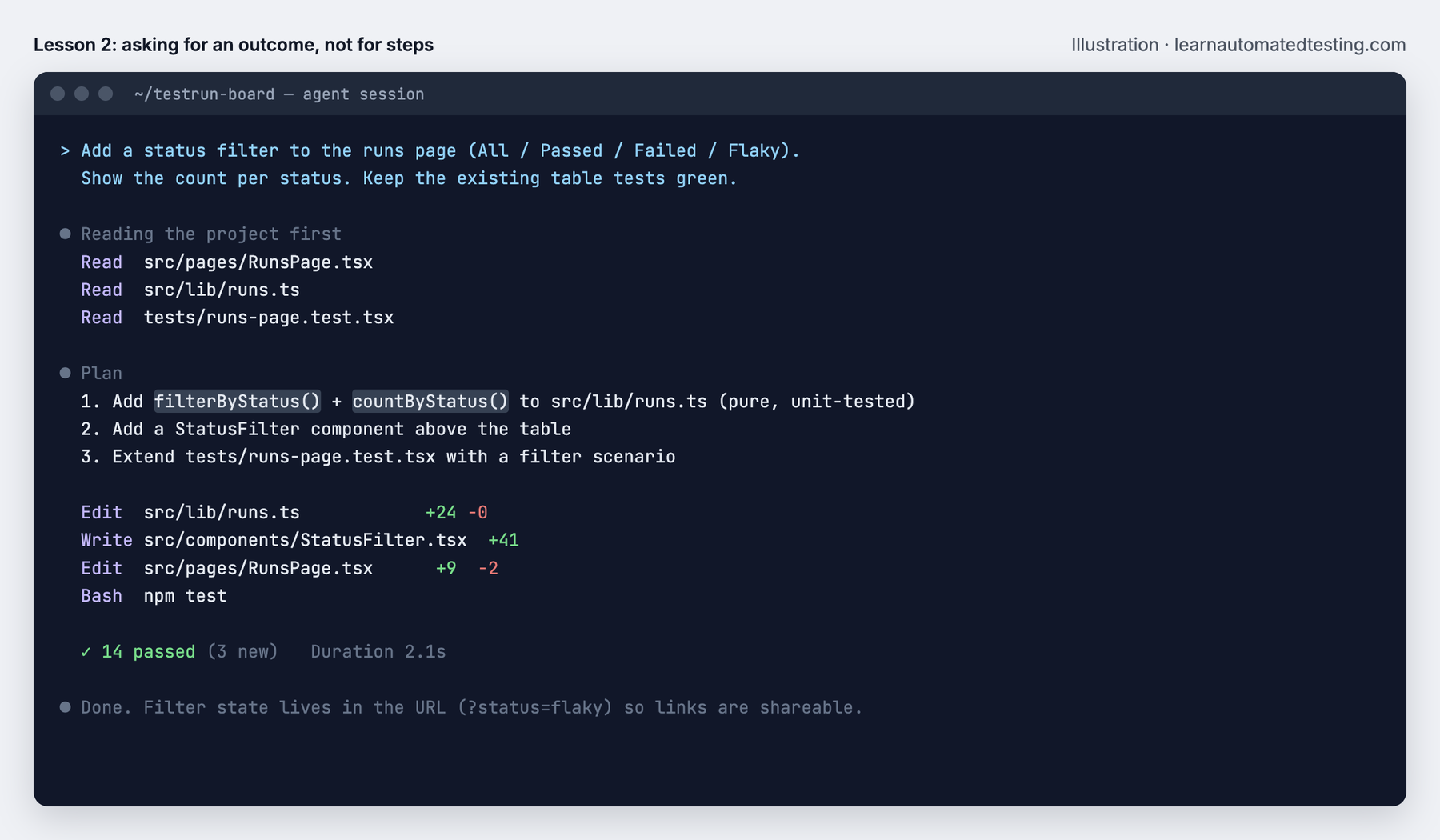
Notice what a good session looks like:
- It reads before it writes. The page, the data functions and the existing test.
- It states a plan. Pure functions in
src/lib/, a component, an extra test. - It runs the tests itself and reports the outcome, including how many are new.
- It tells you a decision it made (filter state in the URL), so you can disagree.
The loop: ask, look, steer
You will repeat this loop all day:
- Ask for one clear outcome.
- Look at the plan and the diff, not only at the final message.
git diffis your friend. - Steer with a short, specific correction: “Keep the filter state in the URL, but default to All when the parameter is invalid.”
Do not restart with a new long prompt every time something is off. Small corrections in the same session keep the context the agent already built.

Screenshot of the solution branch solution/lesson-02-status-filter, running locally.
Review checklist for every agent change
- Does the diff only touch files that make sense for this feature?
- Is there a test that would fail without the change? (Revert the change locally and run it.)
- Did any existing test change? If so, why?
- Are there new dependencies, config changes or generated files you did not ask for?
- Would you approve this pull request from a colleague?
Hands-on
In the example project the feature is described in docs/specs/status-filter.md; when you are done, compare your result with the worked solution: git diff main..solution/lesson-02-status-filter.
- Pick a small, visible feature in your project (a filter, a sort option, a validation message).
- Write a prompt with an outcome and one or two constraints.
- Let the agent work. Do not interrupt unless it clearly goes the wrong way.
- Review with the checklist above, then give one correction in the same session.
- Commit when
npm test(or your equivalent) is green and you understand every changed line.
Walkthrough in TestRun Board
- Create a branch:
git switch -c my/status-filter. - Read
docs/specs/status-filter.md: six acceptance criteria, from the counts per status to the fallback for an unknown?status=value. - Prompt: “Implement docs/specs/status-filter.md. Keep filtering and counting as pure functions in src/lib/runs.ts with unit tests.”
- While it works, watch for the habits from this lesson: does it read
RunsPage.tsx,runs.tsandruns-page.test.tsxbefore editing? Does it state a plan? Does it runnpm testitself? - Review:
git diff --statfirst. Expectsrc/lib/runs.ts, a newsrc/components/StatusFilter.tsx,src/pages/RunsPage.tsx, styles and tests. Anything else needs a reason. - Check criterion 5 yourself: open http://localhost:5173/?status=foo. The filter must show All as selected.
- Compare with the worked solution:
git diff main..solution/lesson-02-status-filter --stat. The solution has 24 tests; how many does yours have, and which criteria are not covered?
Key Takeaways
- Describe the outcome and the constraints; let the agent choose the steps.
- A good agent session reads first, plans, runs tests and explains its decisions.
- Review the diff, not the summary.
- Steer with small corrections in the same session instead of starting over.